Showing posts with label get. Show all posts

Get your 15 minutes of fame at HWBOT today!

HWBOT just reported about the new 3DMARK being released and some early rush from enthusiasts to get their name up on the Hall of Fame. For those of you who are unaware, Futuremark released its new benchmark called 3DMARK. Errrrrr, where’s the rest of the name? There is a FireStorm mentioned in one of the videos but they seem to be calling it 3DMARK. Seems they are following Apple’s recent naming schemes. I’m not sure how popular that naming is seeing Android is taking over everywhere these days.

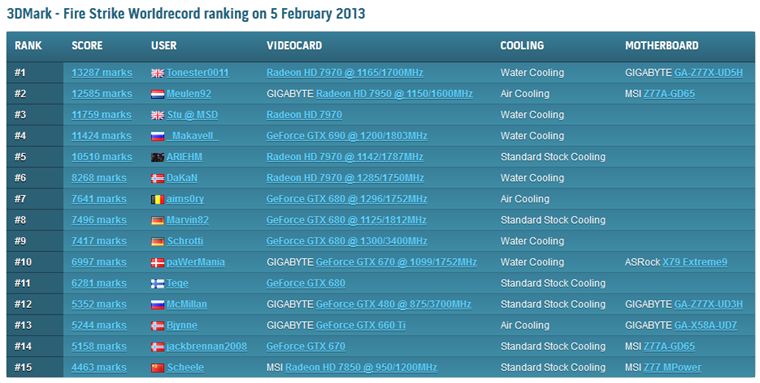
UK overclocker Tonester0011 seems to be enjoying his few moments of fame at the moment with the highest score set on HWBOT’s Hall of Fame with an AMD Radeon HD 7970 and GIGABYTE Z77X-UD5H. Congrats Tonester0011 lol!

With the new 3DMark just launched a couple hours ago, it is a great chance for the quick benchers in this community to grab #1 rank in the Hall of Fames. Tonester0011 from the UK took that opportunity to become one of the first leaders of our 3DMark Fire Strike Hall of Fame ranking, effectively getting fifteen minutes of fame. Nicely done!

To check out the HWBOT 3DMark Fire Strike Hall Of Fame, check here: click.
LkTqKii

Read More..

TeamAU creates a custom “Hotkey OC Control Tool” for GTL get your copy now!

Hey guys,

James T (youngpro) from TeamAU created a handy little tool which allows overclockers to change the speed of their system on the fly with 4 separate profiles that ties into GTL (GIGABYTE Tweak Launcher) software. He calls it Hotkey Control Tool. EasyTune 6 used to have this function on previous chipset but it hasn’t been implemented yet on Z77 as software team is hard at work with a complete refresh of the ET tool.

In the meantime you can use this nifty tool to jump frequencies as simply as hitting function keys (F1, F2, F3 and F4). Keys are fully programmable and I’ve made a brief video explaining how to use it but for a full description make sure you jump to James’ blog AT THIS LINK.

Thanks for sharing James & Team.AU, this will no doubt make it a hell of a lot easier to bench GIGABYTE boards subzero!

Watch the video in 1080p and full screen!

Read More..

Get the most from Sandy Bridge E Introducing the sin0822 Overclocking Guide

benchtable

Power user sin0822 is back on the overclocking guide trail again and this time he’s talking Sandy Bridge-E. So if you’ve invested in a brand spanking new GIGABYTE X79 series motherboard to go with your new Intel i7 processor, or maybe you’ve been a good boy or girl and Santa dropped one off last weekend - either way make sure you take a look at this guide. It gives you a step by step help with overclocking on both air and liquid cooling, plus a whole lot more including in-depth advice on everything from component choices to voltage reading.

You can find the guide on both xtremesystems.org and overclock.net

Enjoy! Cheers Sin…

Read More..

Are you looking to get some fast RAM for the new platform Check out the new GSkill TridentX!

I’ve been doing some RAM testing on the new Z77 GIGABYTE platform and must say I am pretty impressed with how well the new GSkill TridentX memory has been performing.

My testing revolves around frequency efficiency (as in high frequency with very tight timings that is capable of running very fast for the CPU and RAM set frequency limit in SuperPi 32M). I could reach well over 1400MHz frequency with this RAM but 1400MHz(2800) 10-12-12-19-1T was the fastest mix of efficiency and speed. This ram is rated at 1300MHz 10-12-12-31-2T at stock so that is a nice boost past rated speed and timings also.

GIGABYTE and GSkill are planning on putting on an overclocking show for this year’s Computex so keep a close eye on that. We will update you with some news as it happens as well.

Here are some results obtained with GIGABYTE Sniper3 board and GSkill TridentX 2600 kit. I hear Corsair, Kingston and Team Group have similar RAM also, time to get some new RAM to make your platform really shine!

TEST SYSTEM:

  • GIGABYTE Sniper3 (Z77 based) motherboard
  • Intel 3770K Ivy Bridge CPU
  • GSkill Trident X 2600
  • Corsair F90 SSD
  • Corsair HX750 Power Supply

photo

screeniks

Running daily testing for me is done on an old Mach SS cooler that runs at –40C. Perfect for long superpi testing sessions! Getting high frequency RAM clock on Z77 can be obtained with all air cooled setup as well which is good news for those putting together their 24/7 high end PCs.

IMG_0093

GIGABYTE Sniper3 is the board i tend to use for my day to day RAM testing. Stable board with great frequency OC and efficiency.

5751_big

Read More..