Showing posts with label your. Show all posts

Get your 15 minutes of fame at HWBOT today!

HWBOT just reported about the new 3DMARK being released and some early rush from enthusiasts to get their name up on the Hall of Fame. For those of you who are unaware, Futuremark released its new benchmark called 3DMARK. Errrrrr, where’s the rest of the name? There is a FireStorm mentioned in one of the videos but they seem to be calling it 3DMARK. Seems they are following Apple’s recent naming schemes. I’m not sure how popular that naming is seeing Android is taking over everywhere these days.

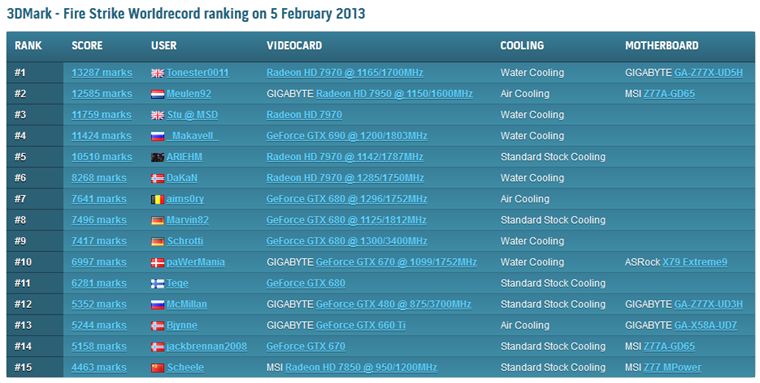
UK overclocker Tonester0011 seems to be enjoying his few moments of fame at the moment with the highest score set on HWBOT’s Hall of Fame with an AMD Radeon HD 7970 and GIGABYTE Z77X-UD5H. Congrats Tonester0011 lol!

With the new 3DMark just launched a couple hours ago, it is a great chance for the quick benchers in this community to grab #1 rank in the Hall of Fames. Tonester0011 from the UK took that opportunity to become one of the first leaders of our 3DMark Fire Strike Hall of Fame ranking, effectively getting fifteen minutes of fame. Nicely done!

To check out the HWBOT 3DMark Fire Strike Hall Of Fame, check here: click.
LkTqKii

Read More..

TeamAU creates a custom “Hotkey OC Control Tool” for GTL get your copy now!

Hey guys,

James T (youngpro) from TeamAU created a handy little tool which allows overclockers to change the speed of their system on the fly with 4 separate profiles that ties into GTL (GIGABYTE Tweak Launcher) software. He calls it Hotkey Control Tool. EasyTune 6 used to have this function on previous chipset but it hasn’t been implemented yet on Z77 as software team is hard at work with a complete refresh of the ET tool.

In the meantime you can use this nifty tool to jump frequencies as simply as hitting function keys (F1, F2, F3 and F4). Keys are fully programmable and I’ve made a brief video explaining how to use it but for a full description make sure you jump to James’ blog AT THIS LINK.

Thanks for sharing James & Team.AU, this will no doubt make it a hell of a lot easier to bench GIGABYTE boards subzero!

Watch the video in 1080p and full screen!

Read More..

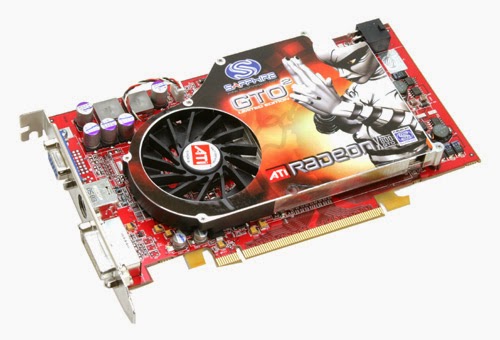
Easiest way to find out Which Graphics card in your Pc


Easiest way to find out Which Graphics card in your Pc


Follow my image instruction then you can easily find out which graphics card in your pc lets go....

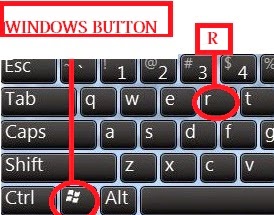
1st step: pressing "windows button+ R"

GRAPHICS 1


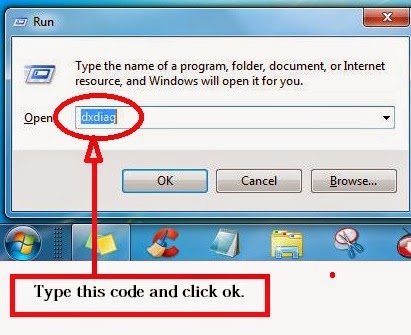
2nd step: then open a window and type "dxdiag". Then click ok 
g2


3rd step : click display display option then get details about your graphics drives


Read More..