Showing posts with label gigabyte. Show all posts

GIGABYTE 8 Series OC Boards Most eagerly awaited on OCN

We just came across a few polls posted on Overclock.net that attempts to gauge which Z87 boards Overclockers are most looking forward to. The first poll asks: ‘Which brand would you buy a Z87 Motherboard from?

It’s really encouraging to see 66% of votes going to GIGABYTE.

OCN-Poll-2

Another poll also posted on OCN asks specifically about OC and gaming board models: ‘Which gaming/overlocking Z87 motherboard are you most looking forward to?’ Again we can see GIGBAYTE out front with 39% of total votes cast.

OCN-Poll-1

We’ve really put a great deal of thought into our forthcoming OC offerings, pulling out all the stops to give Overclockers an absolutely awesome OC experience. Hicookie and our engineers have been working ceaselessly for several months now, ensuring every last detail is nailed. So it’s really, really encouraging to see the OC community is so stoked about these boards.

Overclock.net links here and here.

Read More..

GIGABYTE X99 New Function QFlash Plus

On an healthy running system, you can easily update your BIOS using the @BIOS option found in the App Center. But in the unfortunate event that both your main BIOS and Backup BIOS becomes unavailable, or that you have a new CPU that requires a different BIOS, you will not be able to boot up your system to access the App Center. That is where QFlash Plus comes handy. Here are the steps to follow to flash your BIOS using QFlash Plus.

- Make sure your USB thumb drive is formatted in FAT32 and upload the BIOS you want to flash to it. You can find the latest BIOS version for your motherboard on GIGABYTE’s website : http://www.gigabyte.com/support-downloads/download-center.aspx?ck=2

- Rename that BIOS file to GIGABYTE.BIN

- Turn OFF your system and plug in your USB thumb drive in the white USB port located at the BACK I/O panel.

- Turn your system ON and wait for the BIOS to be flashed. This step may take a few minutes, do not reboot your system or remove the USB thumb drive during that process. An LED located next to the white USB port will blink showing that the new BIOS is being uploaded to your system. Once this LED is turned off, the process is complete.

- Turn off your system, remove the USB thumb drive and restart your system.

Voila!

In the following video, Colin gives you a demonstration on how to use QFlash Plus on GIGABYTE X99 motherboards.

Read More..

First Sneak Peek at GIGABYTE X99 Series

There it is! Unless this picture is shared around before I can write the end of this post, here and our Facebook page are the first two places on the Internet where you can get an exclusive look at GIGABYTE’s new motherboard, the X99.

Be ready, X99 is coming soon!X99-Gaming_G1_WIFI_00

Read More..

The Stig overclocks his GIGABYTE Z77X UP7 to the max!

GIGABYTE Z77X-UP7 is making some extreme OC waves all the way from south island of New Zealand. New Zealand is probably better known as land of “Lord of the Rings” and all things sheep but there is one crazy tech scientist dude out there who is not afraid of earth quakes and braves it out in his dungeon with liquid nitrogen and some crazy computer hardware.

Some say his choice of drink is Jim Beam, sheep milk and LN2! TeamAU boys know him as deanzo but all we know is that his real name is The Stig. Yes, that’s right, The Stig is from Christchurch New Zealand and he’s a massive tech geek by night. BBBBBCCC will not be happy with this news but there I’ve said it!austin-powers-martini

I had a look at HWBOT’s front page today and found some crazy scores from Deanzo lighting up all the top scores of the day. HWBOT for those of you that are not in the know is world’s best and biggest geekfest overclocking database and centre of nerd fight OC battles for the last few years. The Stig otherwise known as Deanzo lit up the front page with some tremendous benching using his favourite new weapon, GIGABYTE Z77X-UP7.

Yeah baby!

Congrats deanzo and keep smashing those results with the UP7, love your work!

Clipboard01

Clipboard01s


check out how iced up his PC was after the benching session was over!!!! WOW

409245_541259939224787_744848273_n

Read More..

GIGABYTE USB Blocker now available on AMD Platforms

USB_Blocker_thumb%255B2%255D

Good news today ladies and gents, our exclusive USB Blocker utility that has been available on Intel platforms since August is now also available on both AMD FM1/FM2 and AM3+ platforms. For those of you who have missed it, the GIGABYTE USB Blocker is very simple utility that you can download and install for free on the gigabyte website that allows you block certain USB device types on your PC. This is a simple way to control what kind of devices can connect to your PC over USB, useful for example when you want to block USB thumb drives and hard drives on a public computer.

USB-Blocker-GUI_thumb%255B1%255D

The GUI (above) is simple to use. You simply select the class of USB device that you would like to block, enter the password, select to block or unblock and youre done. Devices classes that are blocked will subsequently be ignored by the Windows 7 OS.

To start using the GIGABYTE USB Blocker:

  • Go to your motherboard’s download page on the GIGABYTE website
  • In the drop down menu, select ‘Utility’
  • You’ll find the download link for USB Blocker on the list of available utilities
  • Right click on the destination closest to your location
  • Save to a specific folder on your hard drive
  • Click on the installer and follow the on screen instructions

Note: USB Blocker requires that you have Microsoft .NET Framework 4 (full Version) installed. You can get that directly from Microsoft here: http://www.microsoft.com/en-us/download/details.aspx?id=17718

Read More..

GIGABYTE X99 New Function Ambient LED

With the new X99 motherboards LED design, GIGABYTE is introducing Ambient LED. In the video bellow, Colin introduces this function made to help control how your GIGABYTE X99 motherboards LEDs react.
Read More..

Corsair Build Orange ‘Trick or Treat’ PC wth GIGABYTE Z87X OC Motherboard

With it being Halloween last Thursday, the guys at Corsair had the notion of doing a special build based on their newly launched ‘Orange’ Graphite Series 230T chassis. Of course it goes without saying that they opted for a GIGABYTE Z87X-OC as the motherboard. The result, as the images below testify, is this totally awesome looking rig.

03

05

IMAG0327

52

Check out the full story on the Corsair blog.

More info on the GIGABYTE Z87X-OC motherboard.

Read More..

Do you deserve a GIGABYTE Z77X UP7 motherboard

Fancy the chance to win a GIGABYTE Z77X-UP7 motherboard? If so, then today is your lucky day. Head on our to our Facebook where you will find this photo. Leave a comment telling us why you, above all others, are deserving of our top of the line, flagship motherboard, the GIGABYTE Z77X-UP7.UP7_851x851_facebook 

The comment that gets the most likes between now and midnight on April 14th 2013 will soon be a proud owner of one of the most attractive, powerful and feature filled boards ever. Good luck!Z77X_UP7Check out our Facebook page here.

More info about the GIGABYTE Z77X-UP7 motherboard can be found here.

Read More..

‘Pi is Returned’ A GIGABYTE OC Contest on HWBOT

pi_1920x1024

Last Friday evening we launched our latest overclocking contest on HWBOT, Pi is Returned. The big news with this contest is that AMD and ourselves have managed to stump up some nice fat cash prizes – over 5 grand in total as well as some pretty attractive hardware prizes too.

The idea is pretty simple: Two AMD platforms – FM2/1 & AM3+ - on two classic benchmarks – Super Pi 1M and Super Pi 32M. Here’s the break down of stages and prizes in more detail:

Group A - FM1/2 (Llano/Trinity/Richland)

Stage1: Super Pi 1M

  • 1st place - USD $500
  • 2nd place - USD $250
  • 3rd place - FM2A85XN-WIFI & AMD A10-6800K
  • World Record - USD $500
  • Target score: 11sec 359ms (full list)

Stage2: Super Pi 32M

  • 1st place - USD $500
  • 2nd place - USD $250
  • 3rd place - FM2A85XN-WIFI & AMD A10-6800K
  • World Record - USD $500
  • Target score: 10min 40sec 875ms (full list)

Group B – AM3+ (Bulldozer/Piledriver)

Stage1: Super Pi 1M

  • 1st place - USD $500
  • 2nd place - USD $250
  • 3rd place - 990FXA-UD3 & AMD FX-8350
  • World Record - USD $500
  • Target score: 10sec 93ms (full list)

Stage2: Super Pi 32M

  • 1st place - USD $500
  • 2nd place - USD $250
  • 3rd place - 990FXA-UD3 & AMD FX-8350
  • World Record - USD $500
  • Target score: 10min 31sec 770ms (full list)

Note: the World record bonus prize of USD $500 will be awarded at the end of the competition to the highest score per stage, if the target record has been broken.

Visit the official Pi is Returned competition page on HWBOT here.

Read More..

GIGABYTE ‘Feel the Force’ Star Wars Quote Contest Quote and Winner Revealed

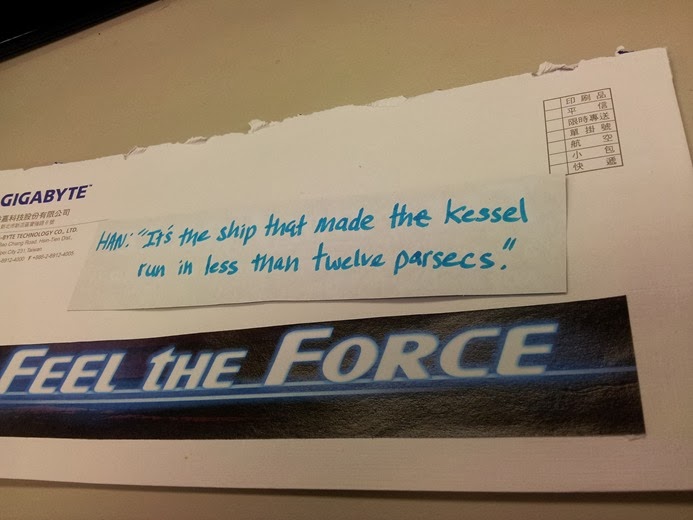
Earlier this week we asked all our Facebook fans and followers to try and guess which quote from the original Star Wars movie we had hidden in an envelope… a big thanks to the hundreds of you that took part, but before we announce the winner, let’s open said envelope and reveal the quote:
FeelTheForce-Envelope-Winner

Winning Quote: Han Solo - “It’s the ship that made the kessel run in less than twelve parsecs”

As I mentioned in the comments on Facebook, it is kind of (hmm…very loosely) related to overclocking and benchmarking… if you consider the kessel run to be benchmark of course. According to Wookieepedia:

The Kessel Run was one of the most heavily used smuggling routes in the Galactic Empire. Han Solo claimed that his Millennium Falcon "made the Kessel Run in less than twelve parsecs". A parsec is a unit of distance, not time. Solo was not referring directly to his ships speed when he made this claim. Instead, he was referring to the shorter route he was able to travel by skirting the nearby Maw black hole cluster, thus making the run in under the standard distance. By moving closer to the black holes, Solo managed to cut the distance down to about 11.5 parsecs. The smuggler BoShek actually beat Solos record in his ship, Infinity, but without cargo to weigh him down. A few months later, Han Solo beat both his own and BoSheks records in a run he made with Luke Skywalker.”

parsecs

Three people correctly guessed the quote:

  1. Luie Arellano
  2. Jesse Que
  3. Sergio Nergal

Well done guys. Each person was designated a number from one to three (same as above), and using a random number generator at random.org, the number 2 was chosen. Congratulations to Jessie Que in Australia who will shortly be the proud owner of a GIGABYTE Z87X-OC motherboard - a Millennium Falcon in motherboard form you might say… ;)

Thanks once again folks for all who took part…

Check out the ‘Feel the Force’ Overclocking contest at HWBOT.org

Learn more about the GIGABYTE Z87X-OC motherboard here.

Read More..

Video GIGABYTE introduce 8 series Thunderbolt and G1 Killer boards at IDF 2013

Colin and the gang from the US office headed to San Francisco earlier this week to attend IDF 2013. By the looks of things he ran into our buddies from TweakTown who were keen to get an early look at a few of the newer boards were showcasesing at the event, including the newly launched Z87X-UD5 TH board plus the forthcoming Z87X-UD7 TH – both featuring dual Thunderbolt ports.

Check out the video below and you’ll also get a sneak preview of our forthcoming G1-Killer G1. Assassin 3 motherboard which is based on the X79 platform and boasts a plethora of new audio features including USB DAC-UP and upgradable OP-Amps.

TweakTown

Read More..

GGF LAN view review of GIGABYTE Z87X UD3H lots of info on new UEFI bios

Hi guys,

We’ve just come across a YouTube video from GGF LAN guys reviewing the new GIGABYTE Z87X-UD3H. Stuart was particularly impressed with the UEFI bios and spent most of the review discussing it in detail. You should check it out!

Read More..

GIGABYTE 8 Series Preview EasyTune

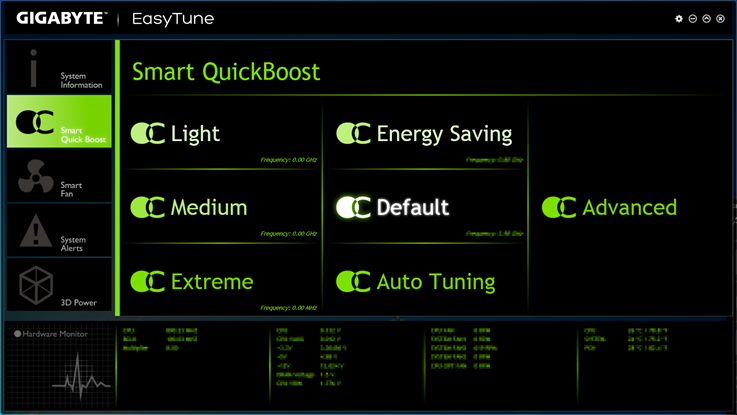
Continuing our efforts to give you all a sneak peek at some of the new features and technologies incorporated in our forthcoming motherboard series, today we’re giving you all a look at our new revised EasyTune app. Check it out…

EasyTune-1

EasyTune-2

If you want to see more of these previews, head on over to our Facebook page where you will find our 8 series preview photo album.

Read More..

GIGABYTE G1 Sniper 3 Editor’s Choice at AnandTech

Gigabyte G1.Sniper 3 BoxBoard_575px

AnandTech chief motherboard reviewer, Ian Cutress, just published an exhaustive appraisal of a several Z77 boards designed with multi-GPU configurations in mind. It’s great to see the GIGABYTE G1.Sniper 3, our flagship Intel Z77 gaming motherboard, pull ahead of the pack with a perfect storm of features, performance and value for money – claiming the prestigious Bronze Editor’s Choice award along the way.bronze_awardHere’s a taste of what Ian had to say;

“It is easy to recommend the Gigabyte G1.Sniper 3 – for the price it provides the performance, the functionality and the extras in the box that a user needs.  Somehow Gigabyte has been able to undercut the competition to good effect, and passing this good value package onto consumers.

With this in mind, I would like to give the Gigabyte G1.Sniper 3 the AnandTech Editors Choice Bronze Award.  For price, performance, and the sense of a good value package, the G1.Sniper 3 offers one of the best price competitive PLX PEX 8747 packages available today.”


You can catch the full and comprehensive review on Anandtech.com here.

More details about the GIAGBYTE G1.Sniper 3 can be found on our product page here.

Read More..

Think Computers unbox and examine the GIGABYTE Z87X UD3H motherboard

Here’s a cool unboxing video from ThinkComputers.com where Bob Buskirk takes a pretty thorough look at our Z87X-UD3H board


Check out the Z87X-UD3H here.

Read More..

8 Series Preview Video Overclock3D net Impressed with GIGABYTE Z87X UD4H

Z87X_UD4H_Rev10_Oblique

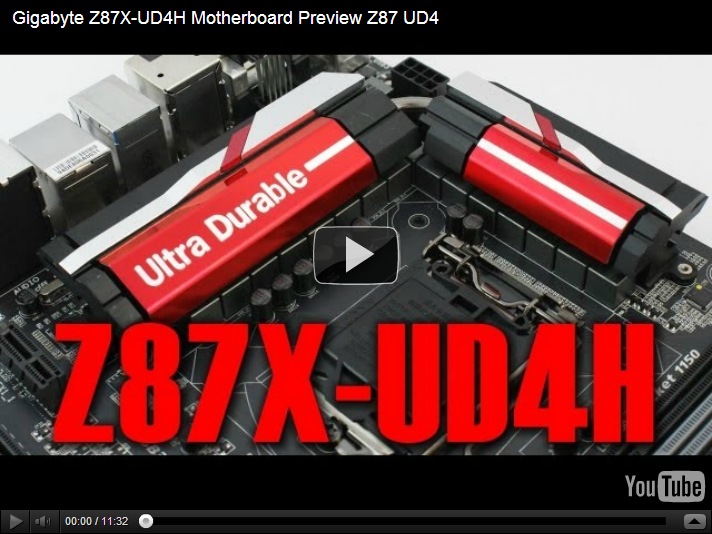
For some users and media there may be just a touch of controversy concerning the design of our GIGABYTE Z87X-UD4H motherboard, simply because we’ve opted for a red and silver finish on the heatsinks.

Red isn’t a color usually associated with GIGABYTE boards (being a color more commonly associated with one of our competitors’ offerings), but with the Z87X-UD4H we’ve opted to go with a fairly subtle red and silver finish on the heatsinks alone, maintaining our black on black color scheme that you’ll see throughout the upper mainstream 8 series range.

Here’s a Z87X-UD4H photo album we recently uploaded to our Facebook page.

One thing is certain, Tiny ‘Tom’ Logan at Overclock3d.net is a definitely a fan of this new color scheme. Check out his preview video below.

Check out the full preview article on OC3D.net here.

Read More..

Blunty3000 shows off goodies at GIGABYTE PAXAU booth on YouTube

You guys should check out this awesome video from PAX Australia with GIGABYTE booth having all sorts of crazy things going on including a liquid nitrogen show, watercooled gaming rigs and a lot of awesome gaming laptops about to be released. The liquid nitrogen rig got some sweet camera work but I loved the dramatic introduction to this video, hahah. It’s awesome!

Read More..

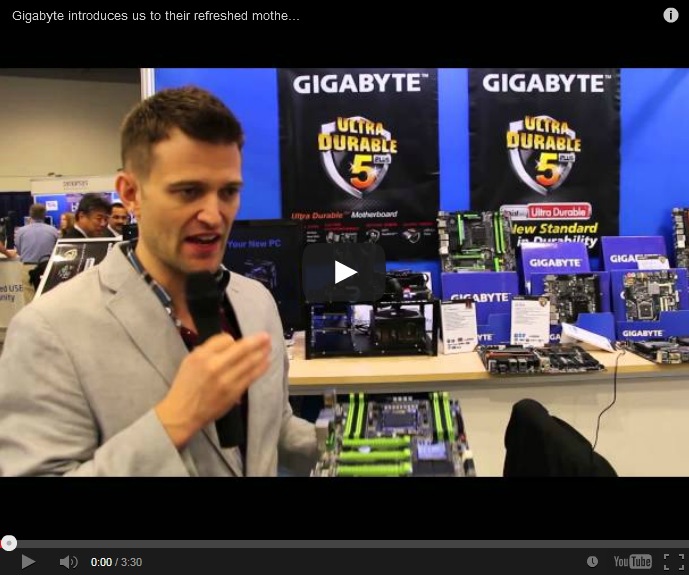
Video Maximum PC take a tour of the GIGABYTE Suites CES 2014

Gordon from Maximum PC shot a bunch of videos earlier this week while taking a tour of the GIGABYTE suite at Caesar’s Palace, Las Vegas earlier this week. Gordon takes a hands on look at our recently launched BRIX Pro, a super compact PC kit that features Intel’s latest i7-4770R processor, most notable for its Iris Graphics 5200. Check out the video below to see the BRIX Pro being put through its places playing Battlefield 4… pretty decent no?


GIGABYTE BRIX Pro product page

Read More..

Gigabyte Graphics Card in BD 2015 Update Price

Gigabyte Graphics Card Price

Brand Gigabyte,  all model Gigabyte graphics card with 2 years warranty is now in all over the Bangladesh. Before buying take a glance about price list about Gigabyte Graphics  Card. Dont miss......

Gigabyte Graphics Card

Gigabyte R5450 DDR3Gigabyte GT610 DDR3Gigabyte N630 2GB DDR3Gigabyte GV-R7 240X DDR3Gigabyte GT640 DDR3Gigabyte GV-N640 2GB DDR5Gigabyte GV- R7770C 1GB DDR5

Gigabyte R5450 DDR3 1GB Graphics Card...............................................................................3,000/=
Gigabyte GT610 DDR3..............................................................................................................4,300/=
Gigabyte N630 2GB DDR3 PCI Express Card..........................................................................5,700/=
Gigabyte GV-R7 240X DDR3....................................................................................................7,200/=
Gigabyte GV-R7240C DDR3.....................................................................................................7,400/=
Gigabyte GT640 DDR3..............................................................................................................8,400/= 
Gigabyte GV-N640 2GB DDR5.................................................................................................8,600/=  
Gigabyte GV- R7770C 1GB DDR5..........................................................................................9,200/=   
Gigabyte R7 250XGigabyte N6500C
Gigabyte R7 250X 1GB...........................................................................................................9,300/=    
Gigabyte N6500C 2GB DDR5 PCI Express Card................................................................12,000/=   

Gigabyte N6600CGigabyte GV-R9 27OCGigabyte GV-R9 27XOCGigabyte GV-R9 28XOCGigabyte GV-N760 OCGigabyte GV-N770OC
   
Gigabyte N6600C DDR5.........................................................................................................17,500/=
Gigabyte GV-R9 27OC 2GB PCI Express Card......................................................................17,500/=
Gigabyte GV-R9 27XOC 2GB PCI Express Card...................................................................19,000/=  
Gigabyte GV-R9 28XOC 3GB PCI Express Card...................................................................29,500/= 
Gigabyte GV-N760 OC 4GB..................................................................................................29,500/=    
Gigabyte GV-N770OC 2GB PCI Express Card......................................................................39,500/=    
   
Gigabyte GV-R9 29D5Gigabyte GV-R9 29XD5
Gigabyte GV-R9 29D5............................................................................................................42,500/= 
Gigabyte GV-R9 29XD5 4GB PCI Express Card....................................................................42500/=

Always visit us for next update.        
Read More..